Minor adjustments to the Android app
Hi! I’m just pointing out the need for a small adjustment to how data is displayed in the Android app:
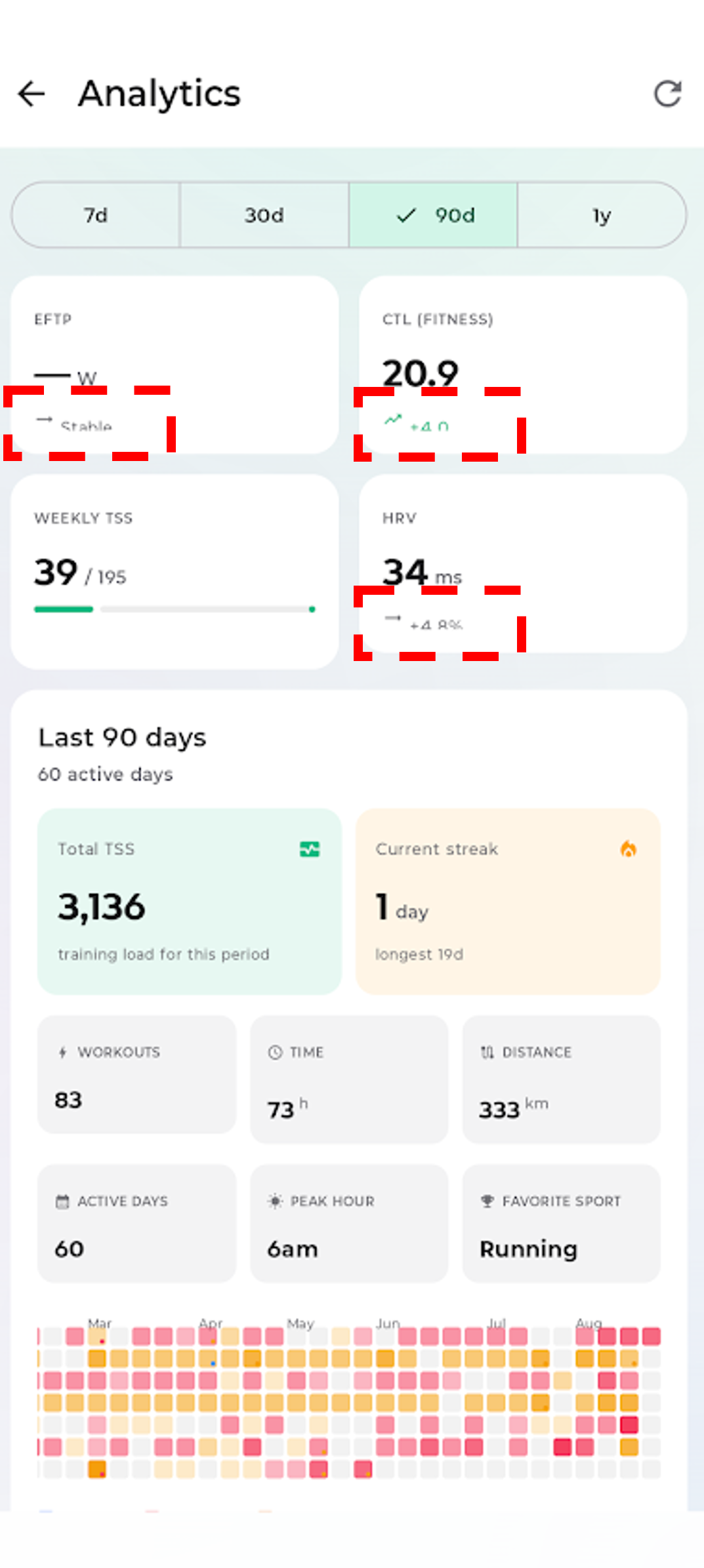
Notice that the trend information for eFTP, CTL, and HRV is truncated, as shown in the image. This doesn't happen in the mobile web version.
Is it possible to have a dark mode in the Android app as well? Currently, I can only use it on the web version.
Thanks!
Log in to comment and vote
Comments1
Martijn Russchen
Sep 28
Hi Henrique, thanks for both, and sorry this sat without a reply for so long.
The cut-off trend values: that's a bug. The row under eFTP, CTL and HRV has a fixed height, so when your phone uses a larger text size, the bottom of the text is cut off. The web page doesn't have that limit, which is why it looks fine there. I'm fixing it so the row grows with the text.
Dark mode: the Android app does have it, but it follows your phone's theme. Switch Android itself to dark (Settings → Display → Dark theme) and the app follows. What it doesn't have yet is its own switch, so you could keep the phone light and the app dark, the way the web lets you choose. I've added that to the list.
Martijn